| DSpotter Online Test Tool V2 使用說明 |
|
注意事項 :
- DSpotter Online Test Tool 預設支援使用 PC 麥克風和Serial port
- 請於選單 [錄音設備] 中選擇欲測試之錄音設備。

開啟模型:
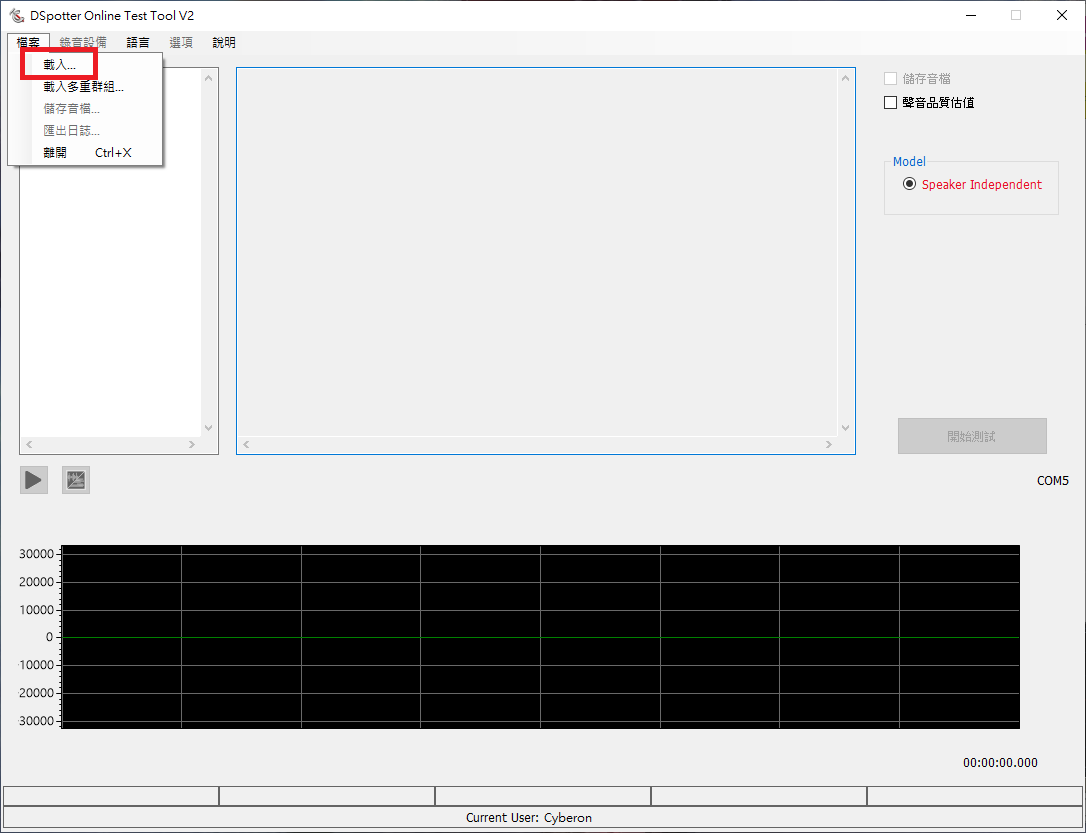
- 由選單 [檔案] > [載入...] 開啟要測試的模型。
使用者介面:
- 1. 儲存音檔: 點選後將測試聲音存檔,置於與模型相同的資料夾,音檔完整路徑顯示於波形圖下方。
- 2. 聲音品質估計: 點選後,於辨識結果後方呈現聲音品質估計的量化數據。
- 3. 開始測試: 點選開始測試即啟動錄音裝置進行辨識,並將辨識結果顯示在畫面上。
- 4. 匯出日誌: 辨識完後可以點選匯出日誌,將辨識結果輸出到文字檔案中。
- 5. 播放/停止播放: 錄音結束後,可以播放或停止播放剛剛錄的音檔。
- 6. 切換顯示所錄下聲音的波形和頻譜。
- 7. 所錄下聲音的波形或頻譜。

載入多重群組:
- DSpotter Online Test Tool 支援多重群組合併辨識, 由選單 [檔案] > [載入多重群組...]。
- 所有群組必須是來自同一專案。
- 首先選擇資料夾。
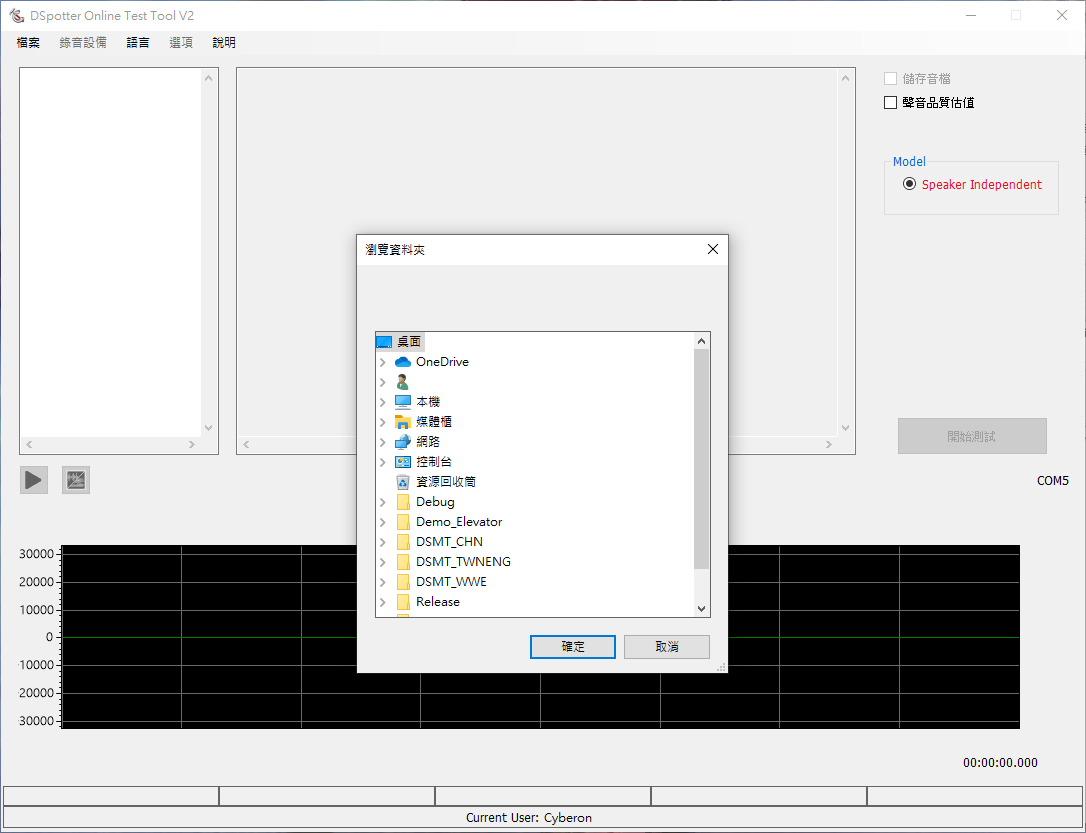
- 再來選擇要合併辨識的群組及順序。

- 選擇的多重群組將會顯示在介面上。

MaxTime
- DSpotter Online Test Tool 支援設定 MaxTime,由選單 [選項] > [設定 MaxTime]。
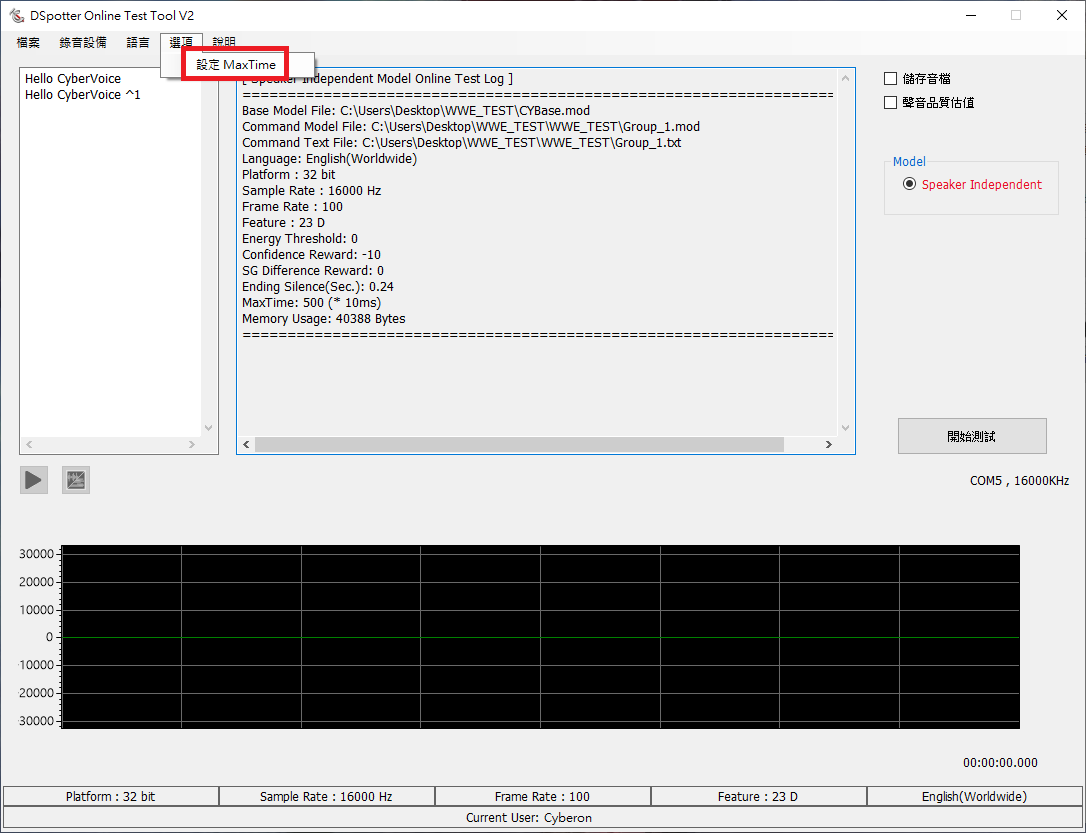
- MaxTime is 是指令的最長長度, 500(frames) = 5秒。
Release notes
2025/04/02:
For more compatible with high-dpi displayers, we change our framework from .Net Framework to .Net Core 8.0.
You may need to install .Net Desktop Runtime 8.0 at 1st time executing the HighDPI App. (2.2.21.X)
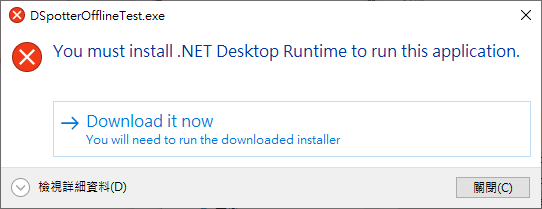
If your can't install the Runtime, install the .Net Framework version App. (2.2.20.X)
Please keep [DSMT / DSpotter OnlineTestTool / DSpotter OfflineTestTool] in the same version (HighDPI or not).
For more compatible with high-dpi displayers, we change our framework from .Net Framework to .Net Core 8.0.
You may need to install .Net Desktop Runtime 8.0 at 1st time executing the HighDPI App. (2.2.21.X)
If your can't install the Runtime, install the .Net Framework version App. (2.2.20.X)
Please keep [DSMT / DSpotter OnlineTestTool / DSpotter OfflineTestTool] in the same version (HighDPI or not).
| Date | Version(App / Engine / HighDPI App) | Description |
| 2026/04/09 | 2.2.25.3 / 2.2.25.3 / 2.2.25.103 | 1. Fix: Wrong statics if .spt contains incorrect .wav files. 2. Fix: Score may be biased slightly if using Environment Perception. 3. Update engine. |
| 2026/03/12 | 2.2.25.0 / 2.2.25.0 / 2.2.25.100 | 1. Update engine. Support Environment Perception |
| 2025/06/06 | 2.2.22.0 / 2.2.22.2 / 2.2.22.100 | 1. Update engine. 2.Add Level information in result. |
| 2025/04/02 | 2.2.20.10 / 2.2.20.2 / 2.2.21.1 | 1. Fix: Spectrum and Multi group dialog error in some high DPI screen. |
| 2024/08/08 | 2.2.20.1 / 2.2.20.2 | 1. Update: Engine 2.2.20.2. 2. Modify: Output result shows starting / ending time. |
| 2023/11/30 | 2.2.19.0 / 2.2.19.0 | 1.Update: engine 2.2.19.0 |
| 2023/10/02 | 2.2.18.1 / 2.2.18.2 | 1.Update: More friendly Msgbox. 2.Update: engine 2.2.18.2 |
| 2023/08/22 | 2.2.18.0 / 2.2.18.0 | 1.Update engine. |
| 2023/07/04 | 2.2.17.2 / 2.2.17.0 | 1.Fix: Fail to check update sometimes. |
| 2023/06/30 | 2.2.17.1 / 2.2.17.0 | 1.Modify: Set default Cooldown to Continue |
| 2023/02/09 | 2.2.17.0 / 2.2.17.0 | 1.Update engine 2.Add: Options for Cooldown |
| 2022/10/21 | 2.2.16.2 / 2.2.16.2 | 1.Update engine 2.Engine version will be displayed in "Help"->"About" |
| 2022/09/28 | 2.2.16.1 | 1.Fix: wrong command energy (=0) |
| 2022/09/22 | 2.2.16.0 | 1.Engine update: 2.2.15.3. |
| 2021/12/03 | 2.2.14.6 | 1.Modify: Default FFT algorithm changed to Complex. 2.Fix: FFT algorithm not set properly during the first execution. |
| 2021/11/01 | 2.2.14.5 | 1.Fix: Slow recognition speed |
| 2021/10/27 | 2.2.14.4 | 1.Add: Options for FFT algorithm (Real or Complex) 2.Modify: Result format. 3.Modify: More precision for time period |
| 2020/12/29 | 2.2.12.0 | 1.Engine Update(AGC for SD) 2.Fix: May not work under Europian language (due to comma and digit). 3.Modify: Remove Android device |
| 2020/10/27 | 2.2.11.0 | 1.Engine Update(AGC) 2.Fix: non-NTFS system error 3.Fix: big-endian error 4.Fix: saveWave default folder problem |
| 2020/09/23 | 2.2.10.1 | Fix: command number mismatch problem |
| 2020/09/18 | 2.2.10.0 | Engine Update, UI Update |
| 2020/08/20 | 2.29 | Engine Update |
| 2020/07/21 | 2.28 | Engine Update |
| 2020/07/16 | 2.27 | Engine Update |
| 2020/06/15 | 2.251 | Add model memory usage |
| 2020/06/02 | 2.25 | Engine Update |
| 2020/05/25 | 2.24 | Engine Update |
| 2020/05/13 | 2.23 | Engine Update |
| 2020/04/24 | 2.22 | Engine Update |
| 2020/03/31 | 2.20 | Engine Update |
| 2020/02/20 | 2.10 | Engine Update |
| 2020/02/03 | 2.03 | Engine Update |
| 2019/12/31 | 2.021 | Fix default value file |
| 2019/12/19 | 2.02 | Display command energy |
| 2019/11/25 | 2.01 | Engine Update |
| 2019/11/11 | 2.00 | First release |